#
Advanced functions
#
Reorder products
The Reorder products number button allows reorganizing the product numbering within a pattern without manually rearranging the elements.
By clicking on the elements, a numerical value is assigned incrementally. Once the pattern is reorganized, click Finish now to apply the changes.
#
Layer auto-fill
The Layer Fill button completes the number of products that can geometrically fit on the specified pallet based on the defined product dimensions. It will offer several possible pattern options.
Warning
The maximum number of products per layer using this option is 64.
Warning
Verify the pattern entry order and approach directions.
#
Center products on layer
Allows geometrically centering the current product distribution within the working area on the pallet surface shown in the interface.
#
Rotate layer 180°
This function automatically rotates the selected layer pattern by 180°.
Warning
Verify the pattern entry order and approach directions.
#
3D preview
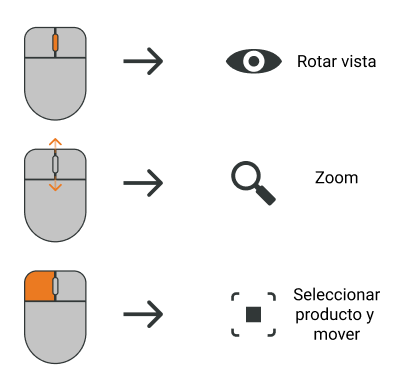
Mouse shortcuts
#
Pattern design management between recipes
This feature allows replicating pattern designs between different recipes.
To do this, save the desired pattern file to your PC, open the recipe you want to modify, and load the file containing the pattern (.mll extension).
Considerations when loading patterns between recipes
If pallet and/or product dimensions differ between the source and destination recipes, incorrect behavior may occur in the destination recipe.
During data loading, the Rear and Front pallet references and the vertex of each product formed by the stopper side and the fixed finger will be used as design references.
#
Save pattern
#
Load saved pattern
Verify the loaded pattern and its compatibility with the design constraints of the palletizing cell.
#
Pattern range check
This feature checks whether, with the established configuration, the robot can reach all positions in the pattern sequence.
Mathematical algorithm 👨💻
This algorithm is executed on Wepall servers. 💻 ☁️ 🖥️ ☁️
If the project presets are not correctly configured, the results of the study will not be valid.
#
Pattern with unreachable robot positions
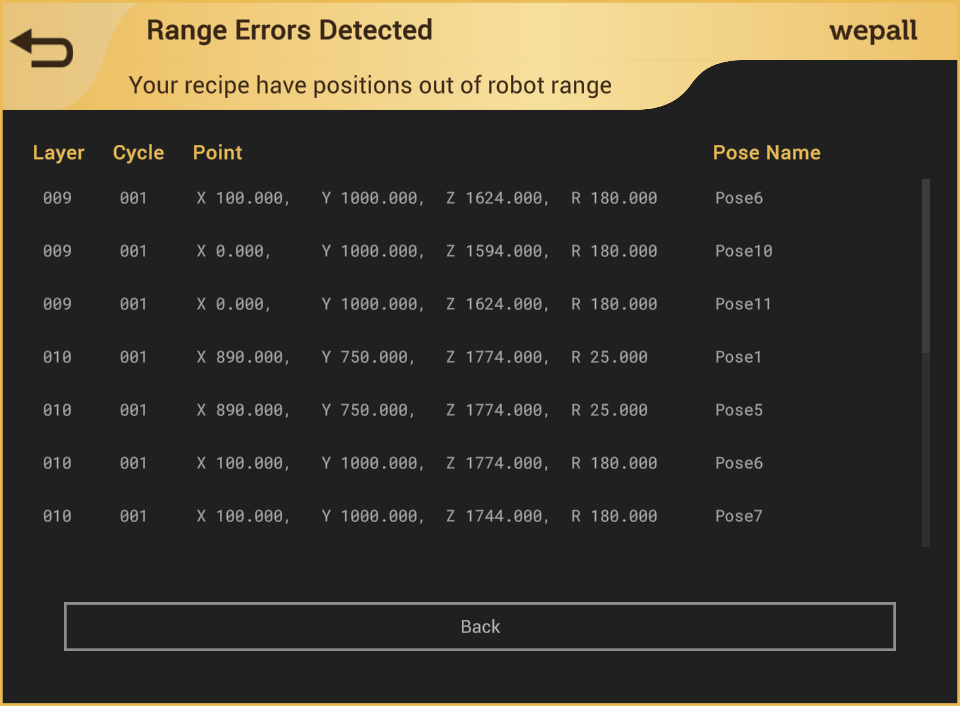
If an error is detected at any point in the trajectory, an information table is displayed with the following data:
- Layer. Layer where the problem was detected.
- Cycle. Within the movements of that layer and according to placement order, the cycle where the problem was detected.
- Point. Cartesian coordinate values of the conflicting points.
- Pose Name. Conflicting Wepall trajectory point.