

#
Product management
#
Product representation in the pattern
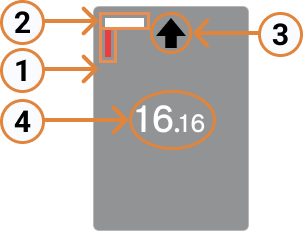
Added products display the following visual references:
| 1. Finger: Represents the fixed position of the gripper. 2. Stopper: Indicator of the side in contact with the pickup stopper limit. 3. Direction: Final approach direction. 4. Number: - Large number: placement order on the pallet. - Small number: pickup order. |
 |
#
Add a product
Add a new product so the user can place it on the pallet representation according to the previously defined pattern.
Each click adds one more element, following the numerical order of the layer.
Below you can see how easy it is to add a product in the Wepall software 🤖.
Warning
Products inserted into the pattern may indicate errors by changing color and turning red. Situations that may generate errors include:
- Product overlap.
- Products outside the pallet surface.
- The product does not have sufficient support from products on the lower layer.
#
Delete a product
The Delete button removes the selected products, reordering the numbering of the remaining elements on screen.