
#
Vacuum Gripper Sequence
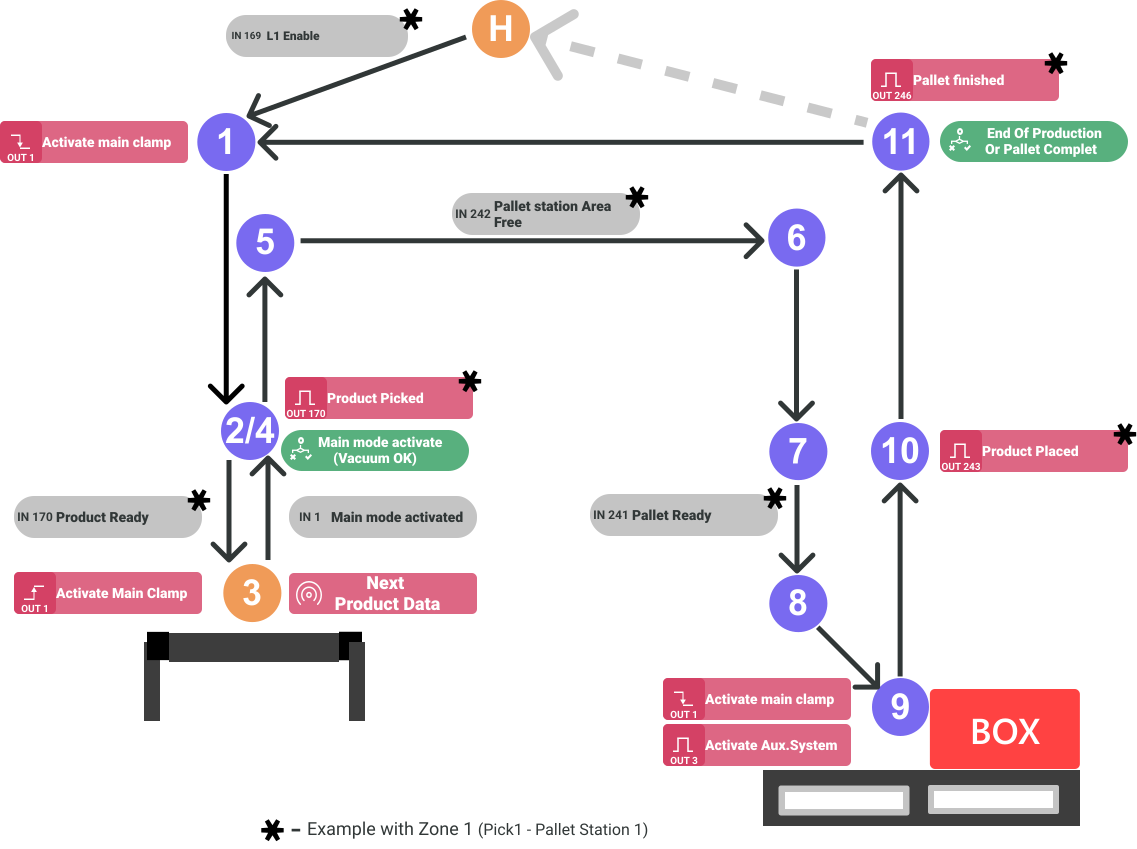
- The robot remains stationary until receiving the line enabled signal (L1 Enable) associated to the recipe. Once the signal is received, the palletizing sequence starts, moving to point 1.
- When reaching point 1, the PLC sends the corresponding signals to place the gripper in position to pick up the product.
- From point 1, it moves to point 2.
- The robot remains in position (2), until the PLC indicates that the product is ready to be removed from the pickup.
- Moves to point 3 and activates the vacuum signal of the clamp (Activate main clamp). In addition, it updates the data of the next movement.
- When you receive confirmation that the vacuum has been reached, move to point 4.
- Upon reaching the point, it verifies that it retains the vacuum, if it has lost it, it issues an error signal and stops the movement.
- If the vacuum is retained, a pulse is emitted to indicate that the product has been picked up (Product Picked). It will then move to point 5.
- Upon arrival at point 5, wait for confirmation that the palletizing station area is accessible. Once this is achieved, movement to point 6 will be initiated.
From point 6, move to point 7.
When it receives confirmation that the pallet is in position at the palletizing station (Pallet Ready), it will move to point 8.
From point 8, move to point 9.
At point 9, the vacuum signal of the gripper is deactivated and activates an overpressure pulse (blow-out). It then moves to point 10.
Upon reaching point 10, a Product Placed signal pulse is emitted and then moves to point 11.
At the end of the sequence, if the end of production signal is present or the last pallet movement has been performed, a Pallet Finished pulse is emitted.
Otherwise, the next corresponding layer and pick count is updated.