
#
Sequence by Contact Sensor
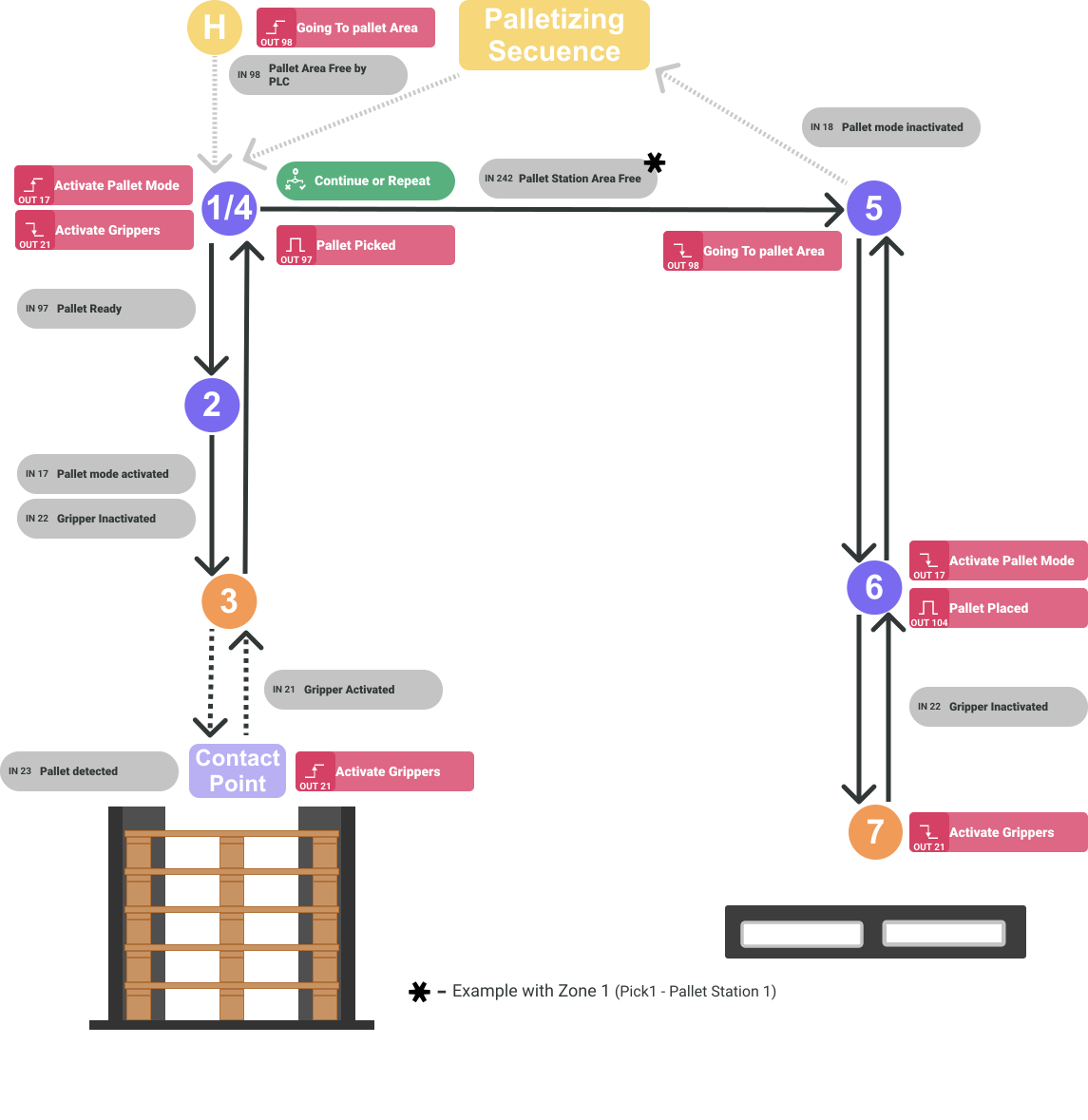
- The robot sends the PLC the Going to pallet area signal, to indicate that it is requesting to enter the pallet pick-up area and remains waiting.
- When the PLC confirms to the robot that it can access the area, it moves to point 1.
At point 1, the robot sends signals to the PLC to place the gripper in position to pick up the pallet.
When the signal is received that the pallet is ready and moves to point 2.
At point 2, it waits for confirmation that the paddle-tapping mode is active. It then moves to point 3.
Once at point 3, the robot starts a downward movement at low speed until it detects the pallet (Pallet detected).
When it detects that it has come into contact with the pallet (contact point) it sends the signal to activate the pallet pick-up system.
When it receives confirmation that the pallet has been taken, it moves to point 3, and from there to point 4.
Upon reaching point 4, the robot sends a pulse indicating that the pallet has been picked up.
Waits for the PLC to indicate that it has made a decision, and whether that decision is to continue the cycle or repeat the pallet pickup sequence.
Once the robot is waiting at point 1, the PLC sends the signal that the palletizing station is free and moves to point 5.
When the robot reaches point 5, the signal requesting permission to access the pallet storage area is deactivated.
From point 5, move to point 6.
It then moves to point 7.
When you reach point 7, you will deactivate the pallet pick-up system signal.
Wait for confirmation that it is deactivated and then return to point 6.
At point 6 presses Pallet place and deactivates the pallet pick-up mode. And moves to point 5.
- At the end of the sequence, you will remain at point 5 before continuing the palletizing cycle, until you receive confirmation that the pallet pick-up mode has been deactivated.