
#
Robot start and execution control
The start of execution of the robot is performed according to the parameters and criteria set by the robot manufacturer, as well as the controller that is integrated into the project. These aspects condition the stop or pause of the running program, and the restart of the execution sequence.
warning Warning
Consult Wepall's technical team and/or the robot manufacturer for the start-up sequence (external automatic) of your controller/robot model.
#
Manual/automatic program selection
Once the robot has started running, it is necessary to select which program to run, either the manual or the automatic program according to certain bits transmitted by the PLC.
This selection will depend on the type of program management integrated in the robot at the start of the sequence. As a general rule, 2 forms of management are envisaged:
By initial single program. In this case, each execution start will go through a single program, and it will be in this one where the decision of whether to run the manual or automatic program is taken (e.g. Kuka's Cell program).
Specific program selection. This mode allows the PLC to directly start the manual or automatic program (e.g. Fanuc PNS system).
warning Warning
Switching from one mode to another means that the execution of the current program is aborted in order to switch to the new mode.
Note
For further information, please contact Wepall's technical department.
#
Manual program
The manual mode program allows the user, through the PLC, to send the robot to the coordinates of home (Go to home) or maintenance area (Go to maintenance area) defined in the software. When the robot reaches the requested position, it will be indicated to the PLC (In Home / In Maintenance). As well as moving through the HMI interface of the PLC the robot.
warning Warning
The travel speed in this mode is controlled by the PLC. For safety reasons, it must be reduced to a safe range, in accordance with current regulations.
warning Warning
Improper use of the motion in manual mode may cause collisions. Use under supervision.
#
Automatic program (Starter) and run cycle control
When starting the Starter program the robot will move to the Home coordinates. Once this point is reached, the PLC is notified by the In Home signal. From this point on, the program will be controlled by the interaction of PLC signals.
The automatic program is divided into 2 sections. The first section manages the data associated with the selected recipe and its layer (Layer) or movement (Pick) to be performed. And a second section in charge of managing the movement sequence associated with the type of gripper, the selected mapping area and the data loaded during the data loading.
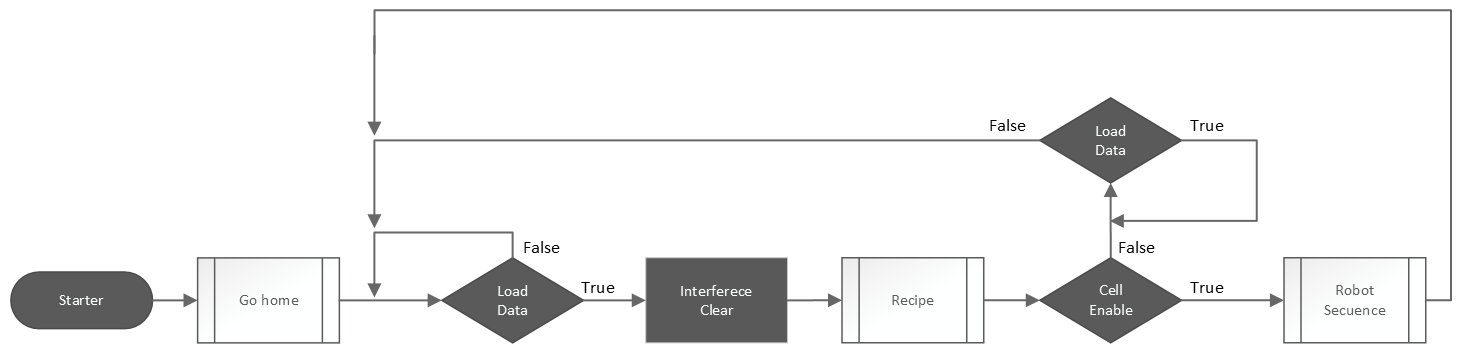
The execution of this program is cyclic so that each time a data load and/or a transaction sequence occurs, it returns to the data load section to update the information of the next transaction.
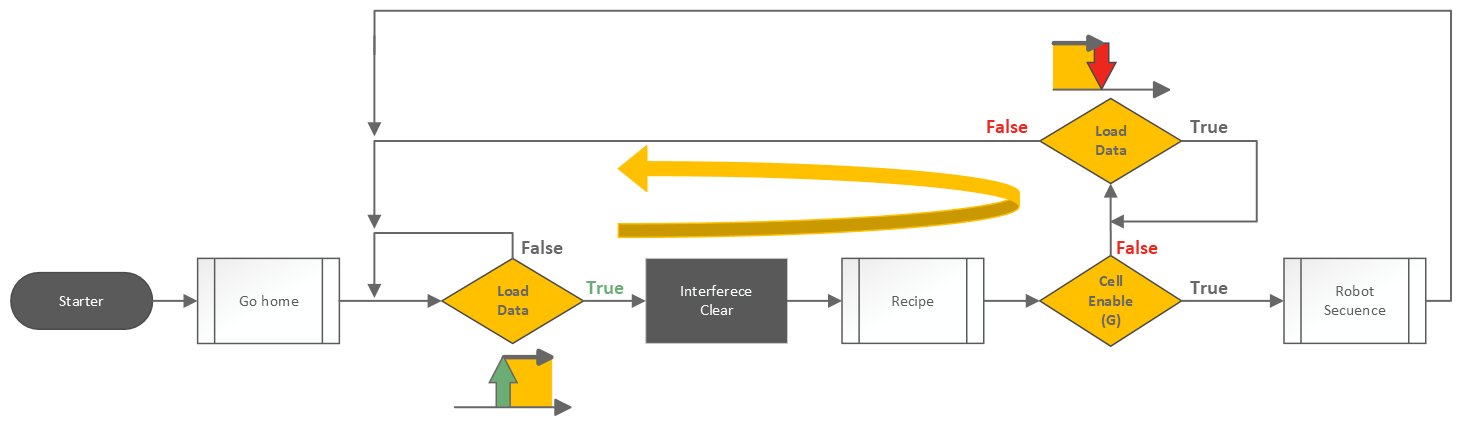
The data loading process is conditioned by the Load Data signal. If this signal is active (true), the data loading process starts, this is in turn divided into 2 sections, the first one dedicated to the PLC to reset internal values of the robot memory, and a second section with the data loading of the selected recipe, being able at this point to force the loading of the information of a specific layer and / or pick. Once the data loading is finished, a pulse of the Data Loaded signal is emitted. Then, if the Cell enable (Global) signal is deactivated, the program waits for the Load Data signal to be deactivated. When this happens, it returns to the starting point of the data loading sequence.
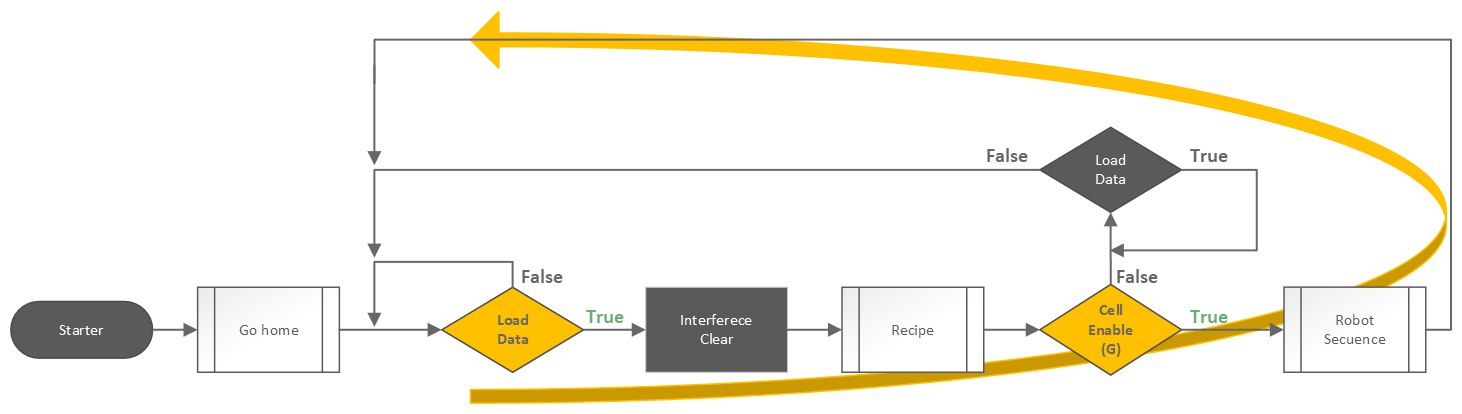
If the Cell enable (Global) signal is active, the motion sequence associated with the selected recipe is executed.
Note
For more information on these steps, please refer to the specific sections of this manual.
By controlling the Load Data, Cell enable (Global) signals, and the zone assignment of each selected recipe, it is possible to control the management of multiple palletizing stations linked to the same robot simultaneously. This control logic is conditioned to the morphology of the palletizing cell and the methodology for its integration with the rest of the elements of the installation.
Note
For more information on managing multiple stations simultaneously, please consult Wepall's technical department.
#
Data clearing
At this stage of the program, the PLC is allowed to reset internal values of the robot's memory, such as the height at which the robot is palletizing at each station/zone, among other data.
During the data loading process, the Clear Data signal of the desired station/zone must be activated. Once the information has been cleared, a pulse is received as confirmation via the associated Data Cleared signal.
Note
When a pallet is removed from the palletizing station, and does not pose any risk to the palletizing stations with which it interferes, the associated area must be data cleared.
warning Warning
Resetting the associated data may cause unwanted collisions between stations (zones) that are interfering with each other. For more information, see the section on interference areas.
#
Data loading sequence
Depending on the selected recipe, the program that stores all the information associated with the recipe and mosaic will be started. Once started, it will check if the layer and pick data are valid, and if so, it will store in memory the coordinates of the required palletizing sequence and other data such as the number of products required and whether they are rotated or not, among others.
If the recipe is 0, the robot can be sent to Home, using the Go to home signal.
warning Warning
An invalid layer, pick or recipe value will stop the execution sequence.
#
Forced layer and/or pick
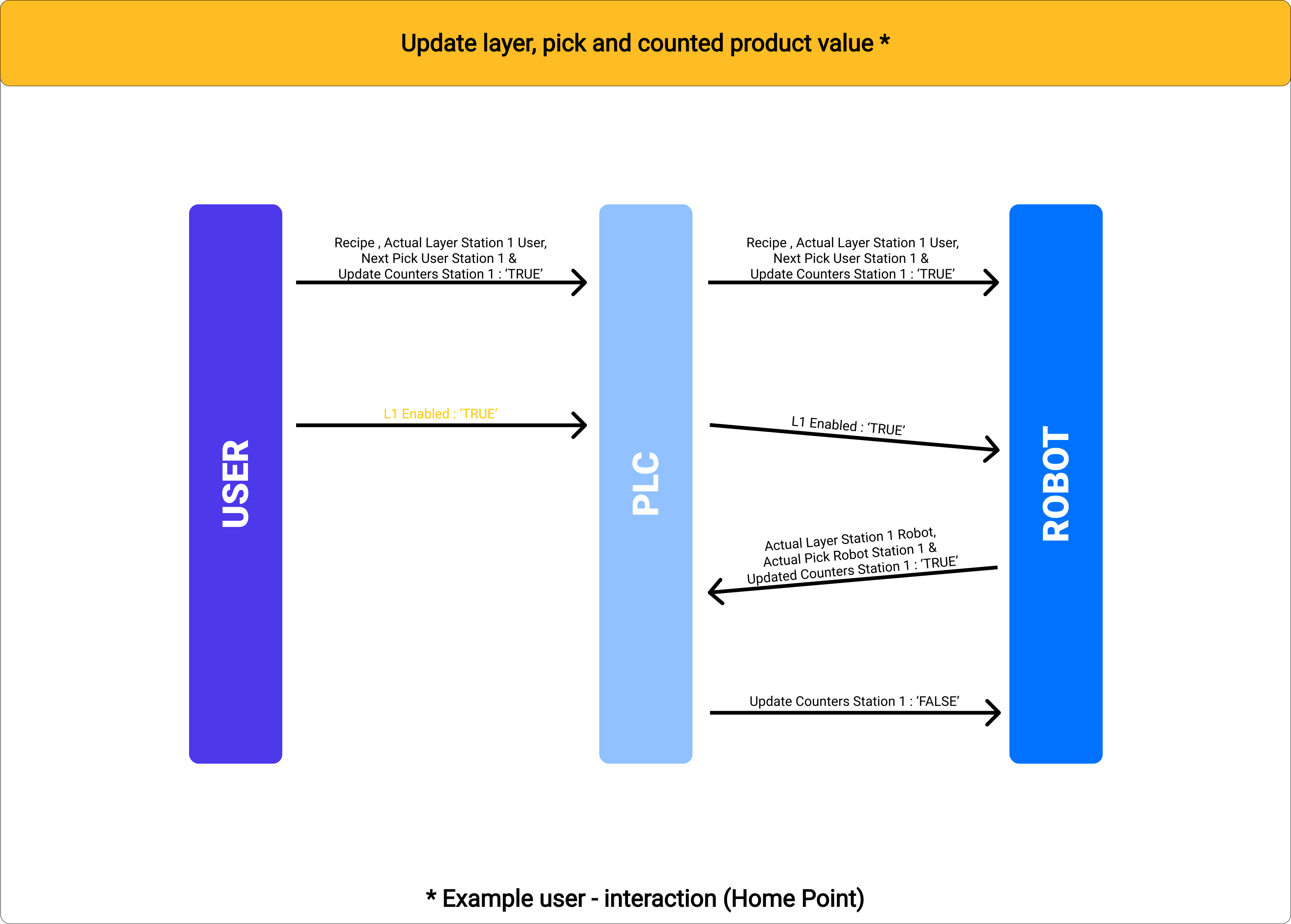
To edit the layer and pick values, before loading the data, the Force Counters signal corresponding to the active recipe zone must be activated. Once the counter update is completed and the data is loaded into memory, a pulse of the Data Loaded signal is received. Once this pulse is received, the Force Counters signal is deactivated.
#
Execution of palletizing sequences
After the data loading process, if the Cell enable (Global) signal is active, the palletizing sequence is started.
Depending on the type of gripper selected, it presents a different type of standard palletizing sequence. By default, 4 different programs are provided for each palletizing sequence, as the mapping integrates 4 different zones (Pick-Pack). Each of these programs uses different memory addresses, depending on each zone.
When selecting a recipe, during the data loading process, it is registered internally which of these programs will be executed. This value was defined by the zone value in the palletizing station node.
Note
For more information on the different sequences depending on the type of gripper, refer to the specific sections of this manual.